One drawing becomes structured parts.
Upload the exploded view, click to place a callout, and the drawing turns into searchable part positions with numbers, names, categories, and quantities.

FOR ECOM
Partsy turns an exploded diagram into an interactive catalog — numbered callouts, a product image for each part, and a View / Buy path straight to your own product pages.
One snippet. No rebuild. No new storefront.
Most parts information already exists — as a diagram, a spreadsheet, or a photo of a printed manual. What spare parts e-commerce has been missing is the layer that makes it usable at the moment a shopper is deciding.
Partsy is that layer. You upload the exploded view once, mark each numbered part, and Partsy serves it as an interactive catalog that lives inside your own storefront — in your layout, on your domain, pointing at your product pages.
No marketplace detour, no second shopping journey. The shopper stays where they were already buying.
Upload the exploded view, click to place a callout, and the drawing turns into searchable part positions with numbers, names, categories, and quantities.
Each numbered part holds a product image and a product page URL. Click the callout and the shopper sees the part and the button that takes them to buy it.
The catalog is delivered by the Partsy JS SDK inside your templates, so the experience stays in your brand and the sale closes in your checkout.
SEE THE INTERACTION
Clicking a numbered callout pulls up that exact part — its image, its details, and the View / Buy button that lands on your product page. No PDF hunting, no guessing, no wrong-part returns.
This is the catalog your storefront renders, shown end to end: callout → part → your product page. The page around it stays yours.
See how it plugs in →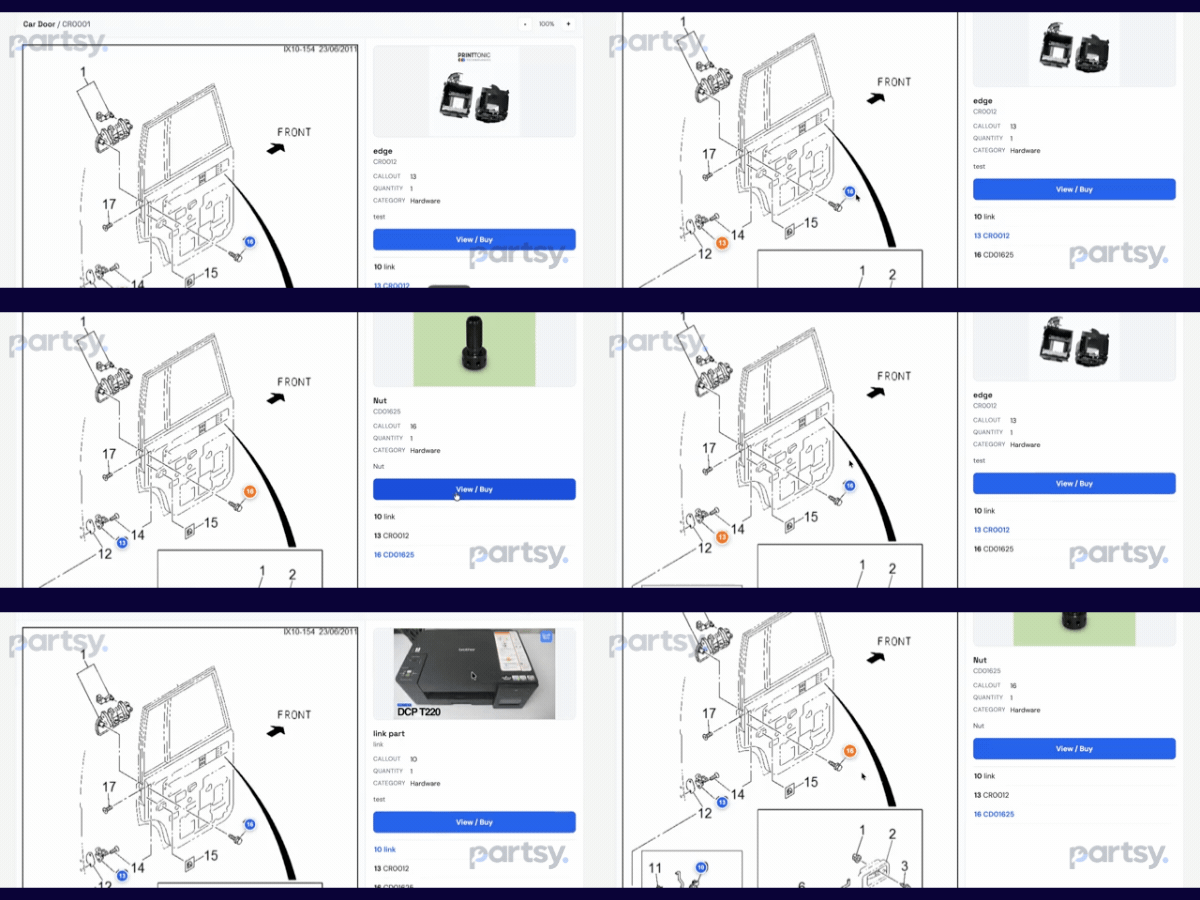
PLUG AND PLAY
There is nothing to migrate and nothing to re-platform. You keep your storefront, your checkout, and your product pages.
Give the catalog a product name and model, then drop in the exploded PNG. Partsy converts it to a crisp SVG that stays sharp on any screen.
Click each position on the diagram to place a numbered callout, then map that part to its image and its product page URL on your site.
Allow the domain that will host the catalog. Partsy issues a client ID and secret, and only that domain can call your catalog.
Copy the snippet from API config into any page template. It is a container and a script — it works in any stack that can render HTML.
SUPPORTED FRAMEWORKS
Partsy is one script tag and a container element, so it drops into any storefront that can render HTML. Eleven platforms have a packaged integration you can install, and the rest run on the same SDK snippet — no rebuild, no migration, no second storefront.
| Platform | Partsy integration | Main implementation | Why |
|---|---|---|---|
 ShopifyIntegration ready ShopifyIntegration ready |
App + Theme App Block | Shopify App / extension | Large ecosystem, clean app model |
 WooCommerceIntegration ready WooCommerceIntegration ready |
WordPress plugin | PHP plugin + Store API / REST | Huge number of independent stores |
 Magento / Adobe CommerceIntegration ready Magento / Adobe CommerceIntegration ready |
Magento module | Module + GraphQL / REST + storefront JS | Excellent fit for complex spare-parts catalogs |
 OpenCartIntegration ready OpenCartIntegration ready |
OpenCart extension | Extension + event system + JS | Very relevant for Indian SMB e-commerce |
 PrestaShopIntegration ready PrestaShopIntegration ready |
PrestaShop module | Module + hooks + Webservice API | Strong international SMB market |
 BigCommerceIntegration ready BigCommerceIntegration ready |
App + Script / Widget | App + storefront integration | Good B2B / e-commerce opportunity |
 ShopwareIntegration ready ShopwareIntegration ready |
App / plugin | App + storefront extension | Strong European market |
 Wix eCommerceIntegration ready Wix eCommerceIntegration ready |
Wix app / plugin | Wix eCommerce extensions | Easy SMB market |
 EcwidIntegration ready EcwidIntegration ready |
App / integration | Storefront / API integration | Good for smaller merchants |
 Salesforce Commerce CloudSnippet ready Salesforce Commerce CloudSnippet ready |
Cartridge / extension | SFCC cartridge | Enterprise, but much higher implementation effort |
 VTEXSnippet ready VTEXSnippet ready |
App / integration | VTEX APIs / apps | Large enterprise / marketplace ecosystem |
 Squarespace CommerceIntegration ready Squarespace CommerceIntegration ready |
Extension / API | External integration | Smaller opportunity for Partsy |
| AEM (Adobe Experience Manager)Integration ready |
HTL component + author dialog | FileVault content package | Enterprise CMS, installed from Package Manager |
How to read the badges. Plugin ready means a finished, packaged integration you can install today. Starter kit installs on an early v0.1.0 build and needs finishing work in your environment. Snippet ready needs nothing from us at all — the Partsy SDK renders the catalog anywhere HTML does, on any of the platforms above or none of them.
WHAT THE SHOPPER GETS
There are no feature gates inside the catalog itself — interactive callouts, part images, View / Buy, live preview, and the SDK are on the free plan and above.
Numbered markers sit exactly where you placed them on the diagram, and selection highlights the part instantly.
Each callout carries its own image, so the shopper confirms they are looking at the right component before buying.
The part detail panel links straight to the page you nominate, so the sale finishes in your own checkout.
Preview any catalog inside Partsy with your own credentials, then copy the snippet that is already filled in for the product.
PLANS
Every plan includes unlimited mapped parts. You only move up when you need more models or more storefront domains. A one-time setup fee applies to paid plans.
“The diagram was already the answer. Shoppers just could not click on it.”
Partsy for ecom / 2026