
BUILD OR BUY
Build or buy a spare parts catalog?
Building it yourself is a defensible decision, and it is the correct one for some businesses. What follows is an honest list of what you would be taking on, so the decision gets made with the whole picture rather than the interesting half.
The interesting half is rendering an interactive diagram. The other half is everything that keeps it working after the first deploy, and that is the half that decides whether this was a good idea.
What you would actually be building
- Diagram ingest. Accept an SVG or a raster image, derive its intrinsic size, and store it somewhere a storefront can fetch across origins. If callouts are not hand-placed, you also need to extract candidate positions from the artwork, which is its own project.
- A callout model. For every numbered position: coordinates, part number, name, quantity, a thumbnail, and the URL a buyer should land on. That is a schema, an editor and a validation path.
- An authoring interface. Somebody has to map each number to a real part, correct mistakes, and see what they are doing while they do it. This is the most underestimated item on the list, because it is neither glamorous nor small.
- The runtime. Fetch a catalogue, render the diagram, position markers relative to the rendered image as it scales and zooms, keep a selection in sync between the diagram and a parts list, and make all of it keyboard-accessible. Marker positioning across responsive widths is fiddlier than it looks.
- Authentication that is safe in a browser. A storefront needs read access to one catalogue without holding a credential that also unlocks the account. That means a browser-safe key with a domain allow-list, or short-lived signed tokens minted server-side. Getting it wrong is a data exposure, not a bug.
- Platform glue. One integration per platform: a Liquid block and metafields for Shopify, a product-data tab for WooCommerce, EAV attributes and a layout block for Magento, custom fields and Script Manager for BigCommerce, a plugin for Shopware. Each has its own install story, its own content security policy, and its own ways to fail quietly.
That is not a two-week project. It is a small product, and it needs an owner — which is the real question, not the build cost.
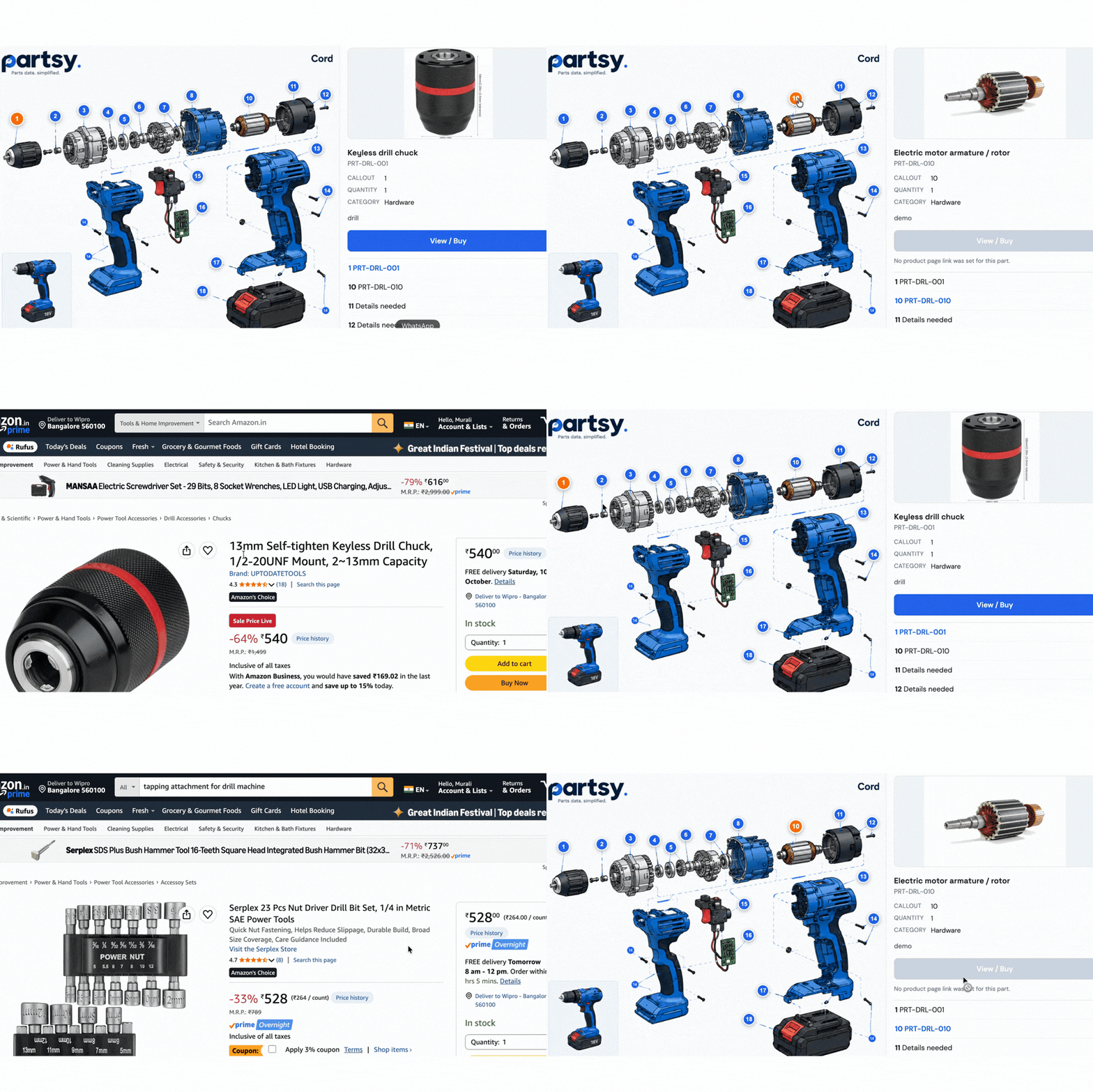
Points two and three are the ones that get under-scoped. Here is that authoring work on a real assembly: placing a callout on the diagram, attaching stock to it, and the inventory those callouts add up to.
The cost nobody budgets for
Software that renders someone else's content is never finished, because the content changes underneath it and so do the platforms it sits on. The recurring work looks like this:
- Redrawn diagrams. A new revision of an assembly shifts every callout. If coordinates are stored against the old artwork, markers land on the wrong components and somebody has to notice.
- Platform releases. Themes get replaced. Magento needs a Content Security Policy entry for any third-party origin. BigCommerce has no server-side product hook to render into. WooCommerce themes occasionally drop the product-summary hook. Each is a support ticket when it happens to one customer.
- Browsers and accessibility. Pointer events, viewport behaviour, focus management. Small, constant, unglamorous.
- Mapping drift. Part numbers get superseded. The diagram still points at a row that no longer exists, and now a click buys the wrong thing.

When building in-house is the right answer
- You already run a team that ships and maintains a storefront or a configurator, and this is genuinely adjacent to what they do.
- Your diagrams need behaviour no product supports — live pricing against a configurator, engineering tolerances, per-customer visibility of only the parts they may buy.
- You support exactly one platform and one diagram format, and you expect that to stay true.
- You have a regulatory or contractual reason that third-party code cannot run on your storefront.
- The catalogue is the product. If a buyer identifying a part is your differentiator, owning that experience end to end is the point of the business.
When buying is the right answer
- Your advantage is the parts, the stock and the service — not the rendering of a diagram.
- You sell on more than one platform, now or soon. Every extra platform multiplies the glue work above.
- You have no appetite for a second product with its own roadmap, on-call and upgrade path.
- You want it live this month, and you would rather spend the effort mapping parts than positioning markers.
The middle path, and where Partsy stops
Partsy is the rendering layer and nothing else. Your diagrams, part numbers, images and product URLs stay yours, and the buy links can point at your own product pages, Amazon, Flipkart or a distributor — your call, per part. We do not become your catalogue and we do not hold your PIM.
That buys you the six items in the first list, already built and maintained, across eleven packaged platform integrations. It does not buy you custom behaviour: if you need a configurator that re-prices an assembly as a buyer ticks components, that is your build, and you should keep it.
For the arithmetic, the cost post breaks it into line items. For the criteria to judge either option, start with how to choose.